 French
 German
 Dutch
Dutch Italian
 Spanish
 Hindi
Hindi Chinese
 Japanese
by William Lynch - Senior Consultant for CTG's Information Security Services Practice, 2 February 2005.
Source- http://www.net-security.org/article.php?id=764
Since their introduction the USB memory stick has been hailed by those fed up with the shortcomings of the floppy. Their small physical size, satisfactory speed and ever-increasing storage capacity makes them the most convenient device to use for transferring files from one place to another. However, these very features can introduce new security risks and amplify risks that already existed with floppy disks. The primary risks associated with USB memory sticks can be identified as:
Virus Transmissions
Whenever files are transferred between two machines there is a risk that viral code or some other malware will be transmitted, and USB memory sticks are no exception. Some USB memory sticks include a physical switch that can put the drive in read-only mode. When transferring files to an untrusted machine a drive in read-only mode will prevent any data (including viruses) to be written to the device. If files need to be transferred from an untrusted machine, the only countermeasure is to immediately scan the memory stick before copying files from it.
Corruption of Data
If the drive is physically lost or uncleanly unmounted, then data loss can occur. Physical loss is covered in the next section and corruption can usually be prevented. USB memory sticks differ from other types of removable media, such as CD and DVD-ROMs because the computer usually has no way of knowing when USB memory sticks are going to be removed. Users of USB memory sticks usually need to alert the computer that they intend to remove the device, otherwise the computer will be unable to perform the necessary clean-up functions required to disconnect the device, especially if files from the device are currently open. The OS will attempt to handle unexpected disconnects as best it can, so often no corruption will occur. However, it is still advisable to research the preferred method for unmounting the device according to the OS documentation.
Loss of Data
Although most USB memory sticks have no moving parts and thus are considerably less prone to mechanical wear than their older and larger counterparts, loss of data can still be an issue. Aside from mechanical failure, data can be lost by accidental erasure, or overwritten. No write capable media device is immune to this risk. The best safeguard against loss of data is frequent and proper backups, as with any other media type. Because of their propensity for physical loss USB memory sticks are best suited as intermediary storage, so it isn't advisable to store the only copy of an item on the memory stick.
Loss of Media
Data loss can occur if the memory stick is physically lost. Untethered drives are most at risk of being physically lost because their lightweight nature allows them to slip out of pockets unnoticed. To protect against physical loss of the device, it’s advisable to have the device tethered to something, preferably a keychain. Some devices have lanyard-style tethers, but use these with caution as the lanyard may only tether the drive cap and not the drive itself, which leaves the drive at risk of falling away unnoticed. Drives tethered to a keychain are less likely to be permanently lost because they are attached to another item that the user has presumably already learned not to lose.
Loss of Confidentiality
Perhaps the greatest benefit of the USB memory stick is also its greatest security risk. Because of its convenient small physical size and large logical size compared it predecessor, the floppy disk, more data can find its way to the USB Memory stick. Some of this data is likely to be confidential and becomes a risk if the media is lost. An executive who uses a memory stick to transfer a customer database from his desktop to laptop could potentially subsequently lose the memory stick. If the stick then finds its way into the hands of a competitor, then the company has suffered a much greater loss than simply the replacement cost of the memory stick. In a similar scenario, if a healthcare professional loses a memory stick containing patient records, then there are legal liability issues associated with HIPAA regulations.
There are two primary ways to mitigate the risk of loss of confidential data, mainly avoidance and encryption. With an avoidance strategy, no data is stored on the memory stick that can be considered private. Clearly, this strategy is severely limiting, not the least of which is determining exactly what constitutes private data. An ideal encryption strategy allows any data to be stored on the memory stick but renders the data useless without the required encryption key, which is usually a strong password, but can also be a biometric such as a thumb print. Some USB memory sticks include their own proprietary encryption algrithms and formats, but often the encryption used is either unproven or inadequate, and the memory sticks are more expensive. However, encryption software is available from many vendors that can be used to protect data on the memory stick. One of these, Cryptainer Lite for Windows from Cypherix® Software is available in a lightweight version, free of charge that will be explored later on
As discussed above, one of the best ways to safeguard against confidentiality loss is through the use of encryption. Many commercial encryption products are available today, but this article will focus on Cryptainer Lite from Cypherix® Software because it is free (as in beer) for both personal AND commercial use, and the product is ideally suited for USB memory sticks.
How Cryptainer Lite Works
Cryptainer Lite functions as a driver for Win32 systems that allows the operating system to view a single encrypted file as a virtual disk. Essentially, once the virtual disk is mounted it is available to Windows just as if it were any other type of disk. A small program is required to mount the encrypted disk and that program can be included on the USB memory stick as well. The portable version does not require installation and can reside on the memory stick as well, making Cryptainer Lite a self-contained encryption system.
Unlike some other vendors who might implement a weak or obsolete encryption algorithm such as single-DES in their free or trial products, Cypherix® uses strong encryption via the Blowfish algorithm. Blowfish is a highly efficient algorithm developed by cryptography expert Bruce Schnier and trusted by even the most paranoid of the security conscious community, the OpenBSD project. Provided that the password selected as the key is securely chosen, data encrypted by Cryptainer Lite is about as secure as it gets, figuratively speaking.
Using Cryptainer Lite to Create an Encrypted Disk
First, download Cryptainer Lite from here. Then, install using the defaults. Once the installation is complete and the program is launched, it will prompt to create the first encrypted disk.
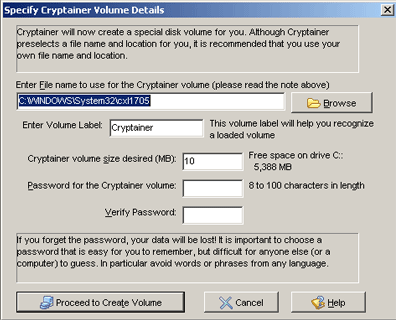
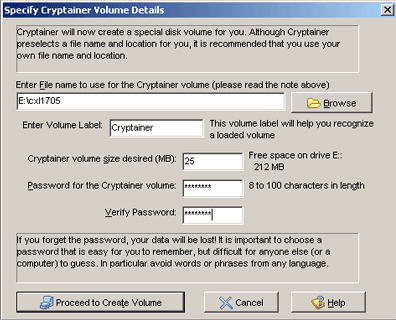
From the display, replace the path for the Cryptainer vault with the path of the USB memory stick. The Cryptainer vault size can also be increased from 10 MB to 25 MB.
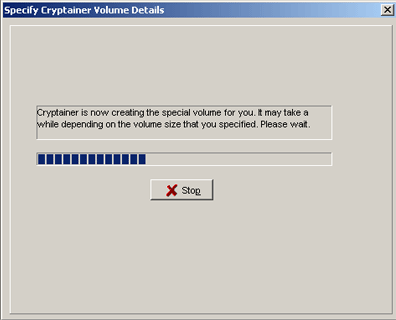
A progress bar will be displayed while the Cryptainer vault is created.
As a security feature, Cryptainer will not automatically remember any encrypted volumes other than the primary volume. This prevents others who access the Cryptainer program from determining where the potential disks may reside. A message box will display a reminder of this.

Once the drive is created, a prompt is displayed indicating that the new volume is available within explorer until it is unloaded.

The Cryptainer console will also indicate that newly created drive has been mounted.
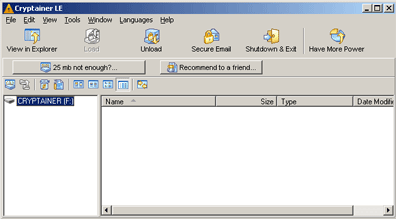
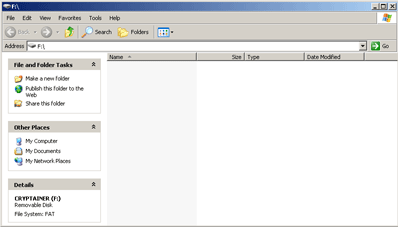
The drive is also available for use from Windows explorer, just like any other volume.
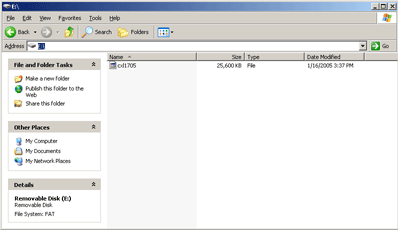
Examining the USB memory stick shows that a 25 MB file has been created with the filename given in the initial prompt.
Unloading the drive using the “Unload” button causes the Cryptainer console to change to the following:

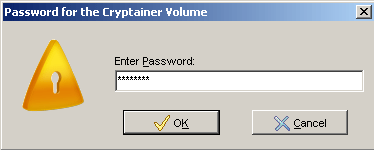
Clicking on “Load” will prompt to reload the newly created volume. The password used when creating the volume is required to reload it.
Loading an Encrypted Disk on Another Computer
How can the newly created volume be accessed if it is moved to a computer without Cryptainer Lite installed? Cypherix® provides the “Cryptainer Mobile” version specifically for this purpose. Cryptainer Mobile is scaled down version of Cryptainer Lite which can be copied to the USB memory stick and run from there without needing to be installed. To enable the Cryptainer Mobile functionality, choose “Install Cryptainer Mobile” from the Tools menu.
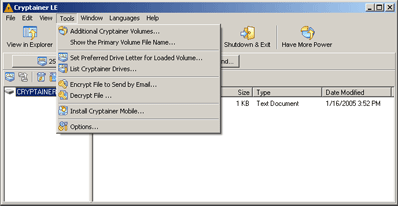
Cryptainer will prompt for the location of theUSB memory stick.
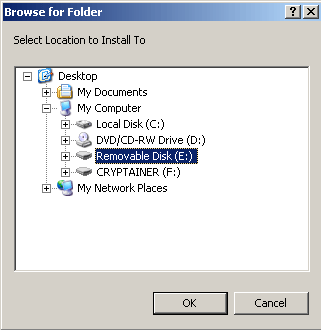
A prompt indicates that Cryptainer has been successfully installed and that Cryptainer Lite needs to be shut down before running Cryptainer Mobile, which can be accomplished by clicking the “Shutdown and Exit” button.

The USB memory stick can be removed and transported to another machine. Once it has been plugged in, browse to the memory stick in Windows Explorer and launch the program “crytainerlemobile.exe”.
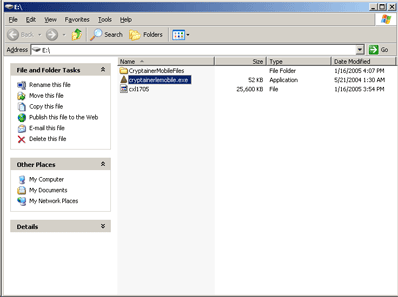
When Cryptainer mobile is first launched, it will want to create a new container volume, but that isn’t necessary. Select “Cancel” to continue.
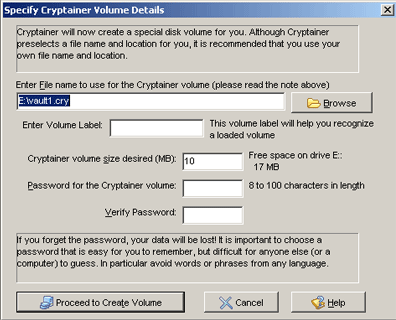
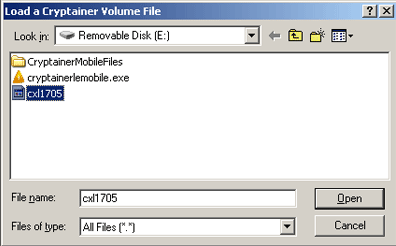
Choose “Cancel” and then select “Load Volume”. Change the file type dropdown to “all f iles” and select the volume created earlier.
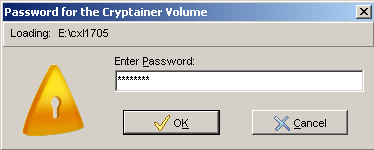
Enter the password for the volume.
Cryptainer will show the loaded volume and function exactly as if it were installed on the second machine. The container is also now available in Windows Explorer and is fully functional.
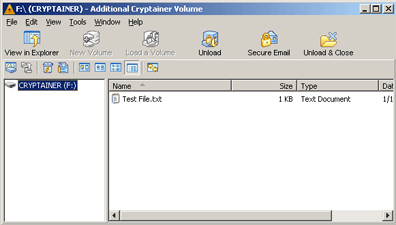
Once finished with the volume, select “Unload and Close”. When the volume is unloaded, select “Shutdown and Exit”. The USB memory stick can now be safely removed.
Limitations of Cryptainer Lite
Despite all the wonderful features of Cryptainer Lite, it is not without limitations. Primarily, the size limitation of 25 MB for each virtual disk is less than ideal, but up to four virtual disks can be mounted at any given time and there is no limit of the number of 25 MB volumes that can be created. Upgrades to versions with larger size limitations are also readily available for very reasonable prices. All versions of Cryptainer are licensed in perpetuity, meaning once a license is purchased, it’s valid for all future versions, forever.
The security of Cryptainer Lite is also limited by the quality of the password selected as the key. Cryptainer makes no judgment regarding the quality of the password for a newly created disk. If the password is of low quality (few characters, can be found in a dictionary, etc.), then it may be vulnerable to dictionary and brute force attacks. However, it should be noted that this is not inherent to the Cryptainer product, but of cryptography in general regardless of implementation.
Summary
USB memory sticks can be used safely and securely if the risks are understood and proper measures are taken to mitigate them. First the primary risks associated with USB memory sticks were discussed and the most important of these are loss of media and loss of confidentiality of data. Next, Cryptainer Lite, a free software program, was shown to mitigate the loss of confidentiality through the use of encryption.